
Centralize product, architecture, delivery, implementation notes, and strategic decisions across Thulija projects in one protected internal workspace.
Internal Knowledge Base
Thulija Projects
9
Projects Available
Use the left navigation to switch between project knowledge pages, technical notes, and product context.
Overview
Thulija Workspace is the central development and deployment environment used by the Thulija development team. Source code is first generated by thulijacoder or tcodegen, then placed inside the workspace for further development. Developers use the workspace to update the generated code, add features that are not provided by thulijacoder or tcodegen, and prepare the final deployable version. The same workspace is then used to support deployment to the production server.
| Owner | Jegan |
|---|---|
| GitHub | thajegan76/thulijaworkspace.git |
| GitHub Status | Up to date. |
Description
Source code is first generated by thulijacoder or tcodegen, then placed inside the workspace for further development. Developers use the workspace to update the generated code, add features that are not provided by thulijacoder or tcodegen, and prepare the final deployable version. The same workspace is then used to support deployment to the production server.
The workspace standardizes the development process from generated code to deployment-ready output. It provides a consistent structure for receiving generated source code, creating runnable projects, allowing developers to enhance and customize the application, and preparing the final deliverables for deployment. This helps support faster enterprise application development while keeping project organization consistent across developers and projects.
What the Workspace Provides
- Shared Development Tooling – Thulija Workspace provides a fully standardized development environment using Dockerfile.allinone. The container automatically installs all the tools needed for development, including Node.js, PHP, Composer, Angular CLI, Ionic CLI, MariaDB, and Git. This allows every developer to work in the same environment, regardless of their local machine setup, and helps reduce installation problems and configuration differences across the team.
- Dockerized Runtime Environment – The workspace uses a Docker-based setup built with Dockerfile.allinone, start.sh, and docker-compose.yml. Instead of asking developers to install and configure many tools on their own machines, the full environment can be started with a single command: docker compose up –build -d. This makes onboarding easier, keeps the development environment consistent, and helps developers start working on projects faster.
- VS Code Dev Container Integration – Thulija Workspace works directly with Visual Studio Code through the .devcontainer/devcontainer.json configuration. Developers can use the standard Dev Containers: Reopen in Container workflow to run Visual Studio Code inside the Docker environment. This gives the team a consistent development setup where terminals, extensions, debugging tools, and runtime dependencies all run in the same isolated environment.
- Project Isolation Using Git Submodules – The workspace uses a Git submodule structure inside the workspaces/ directory. Each enterprise application, such as tcoach or clinic, is kept in its own separate Git repository. This keeps the project source code, version history, access control, and deployment process separate from the main workspace, while still allowing all projects to stay connected to the central Thulija Workspace platform.
- Enterprise-Level Repository Separation – Thulija Workspace uses an enterprise-style repository structure by keeping the main platform repository separate from individual application repositories such as tcoach, clinic, and future projects. This setup helps support remote developer onboarding, controlled repository access, multi-project development, secure project assignment, and easier long-term maintenance.
Workspace Diagram
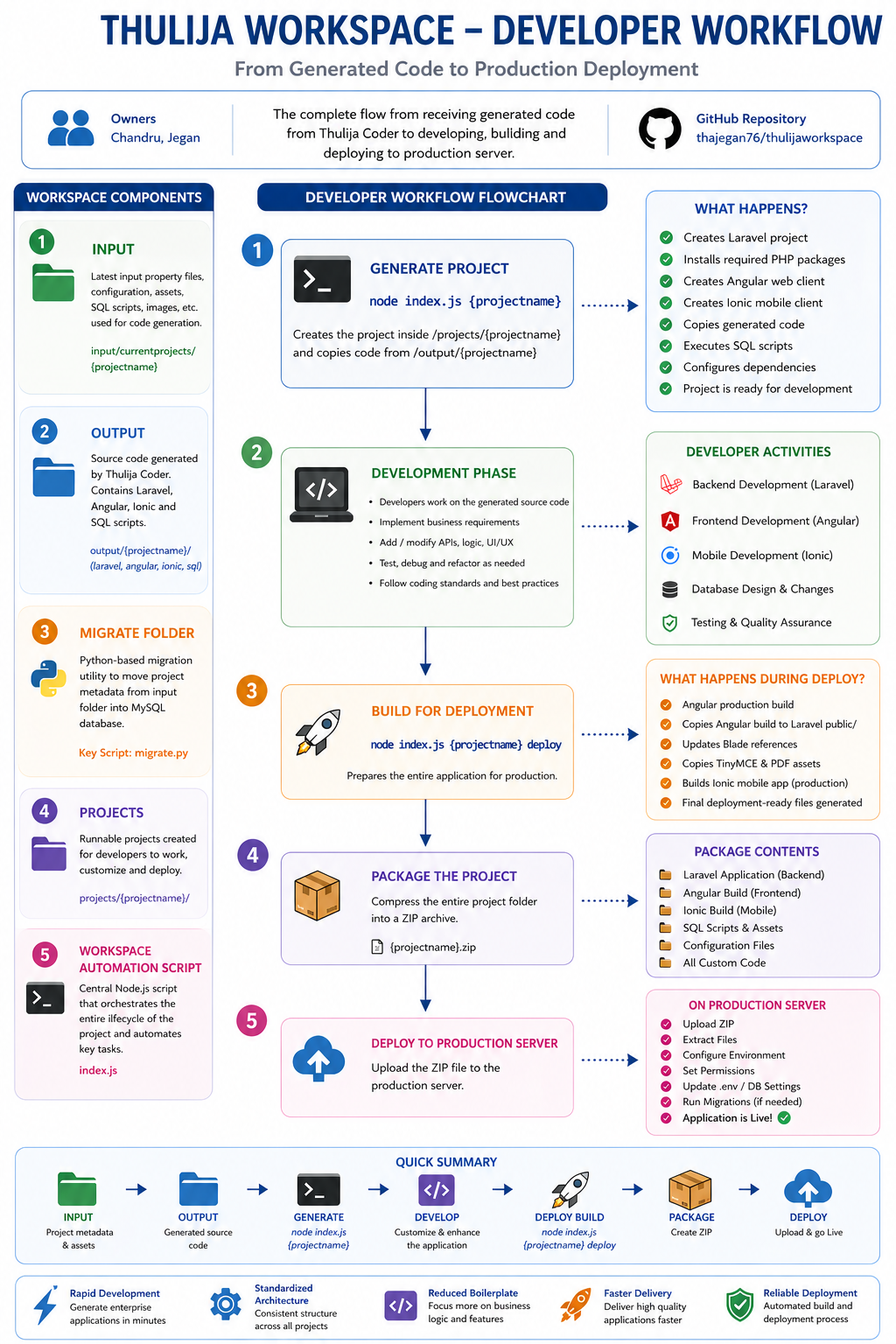
Workspace Structure
The repository contains several important folders that work together as part of the generation and deployment pipeline.
1. Input Folder
The input folder stores the core project metadata, including logical modules, configuration files, and generated assets required for the project creation process.
input/
+-- currentprojects/
|   +-- projectname/
|       +-- assets/
|       |   +-- img/
|       +-- logicalmodules/
|       +-- configuration files
+-- projects/
These files act as the source metadata consumed during project generation.
2. Output Folder
The output folder contains the actual source code emitted by tcodegen/thulijacoder. The generated code is already structured into multiple technology stacks:
- Laravel Backend
- Angular Web Client
- Ionic Mobile Client
- SQL Scripts
output/
+-- projectname/
    +-- laravel/
    +-- angular/
    +-- ionic/
    +-- sql/
This folder is considered the generated source repository before developers begin customization work.
3. Migrate Folder
The migrate folder contains the Python-based migration utility used to move project metadata from the input folder into the MySQL database. This step is important because tcodegen reads its generation metadata from MySQL rather than directly from the input files. The key script in this folder is migrate.py, which reads project metadata from the input structure and loads it into the database in the format required by tcodegen.
migrate/
+-- migrate.py
In practical terms, this folder acts as the bridge between file-based metadata and database-driven generation. As more project input folders are migrated into MySQL, the long-term dependency on the input and migrate folders may reduce or eventually be removed.
4. Projects Folder
The projects folder contains the fully runnable projects prepared for development. When a developer executes the workspace command, the system automatically:
- Creates the Laravel project
- Installs required packages
- Creates Angular and Ionic applications
- Copies generated code from the output folder
- Executes SQL scripts
- Configures dependencies
- Prepares the project for development
projects/
+-- projectname/
    +-- app/
    +-- public/
    +-- resources/
    +-- webclient/
    +-- mobileclient/
This is the folder where developers spend most of their time implementing customer-specific business requirements.
5. Workspace Automation Script
The workspace is powered by a centralized Node.js automation script, index.js, which orchestrates the entire lifecycle of the project and automates:
- Laravel project creation
- Angular project creation
- Ionic project creation
- Dependency installation
- Database migration
- Source code copying
- Build generation
- Deployment preparation